

Examination software
Essential Features of Modern Examination Management Software
Review the examination software features schools need for exam setup, subject marks, result publication and student records.
By Infinio Labs Technologies Pvt. Ltd.
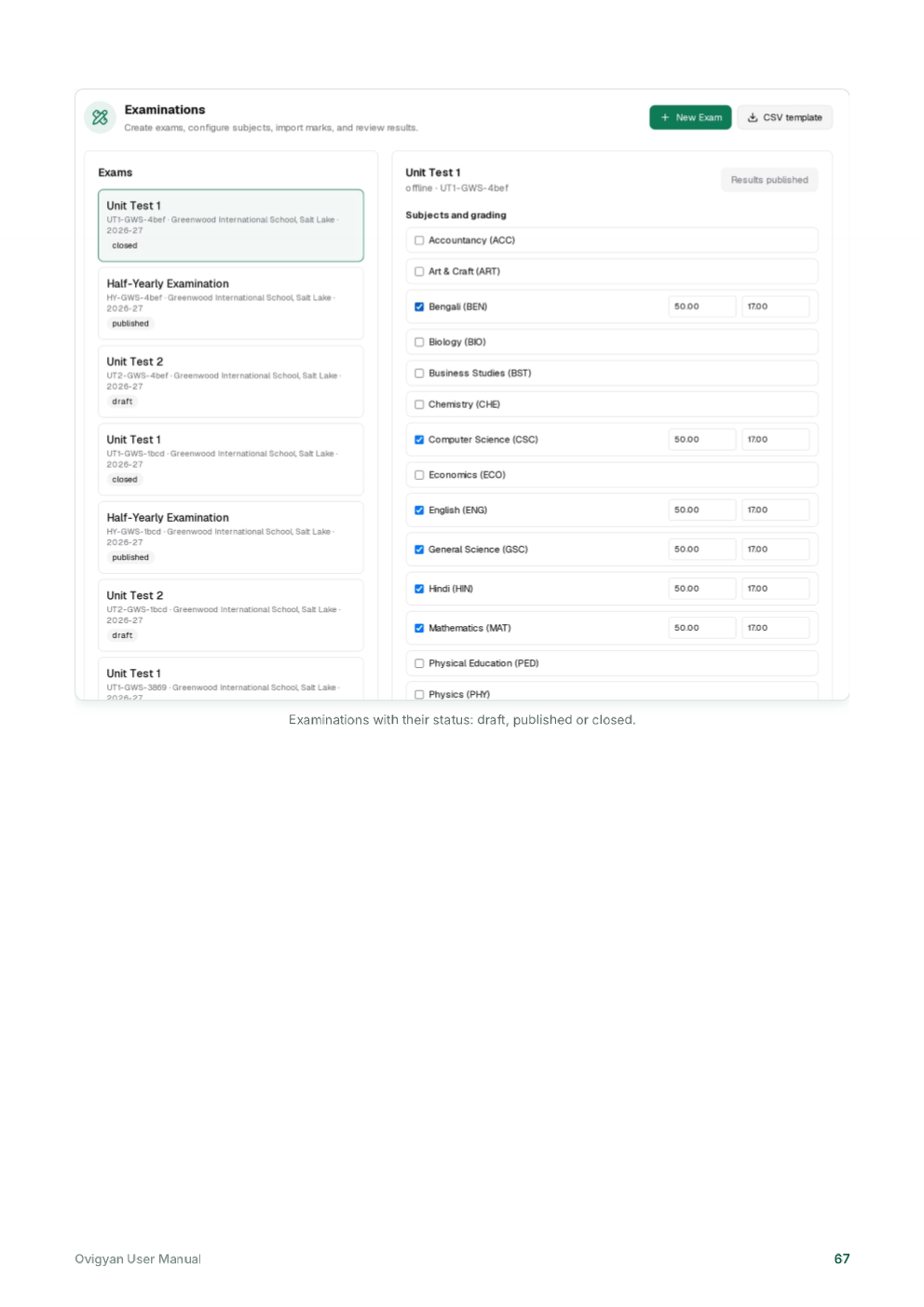
Examination administration involves schedules, batches, subjects, maximum marks, mark entry, review and publication. Examination management software can make these steps easier to coordinate when its setup reflects the school’s academic structure.
Set up exams against the academic structure
Before marks can be recorded, a school needs to define the relevant session, course or class, batch and subjects. Ovigyan’s manual shows an examination setup workflow that associates an exam with a branch and batch, then adds the subjects and maximum marks.
Good setup reduces ambiguity later. Confirm exam names, dates, subject lists and assessment rules with the academic team before opening data entry.
Support accurate mark entry and review
A useful examination workflow helps staff enter marks against the correct student and subject, notice missing entries and review results before publication. Define who may enter, verify and approve marks, and keep a record of corrections according to school policy.
Publish results with care
Students and families should see results only after the school completes its review and publication process. If a portal is used, confirm who can access each result and how corrections are communicated. Ovigyan’s manual describes published results in the student portal; availability depends on the institution’s configuration and publication choices.
Features worth comparing
- Exam and subject setup linked to classes or batches.
- Mark entry, validation and review responsibilities.
- Result views and publication controls.
- Reports or exports that support the school’s assessment process.
- Training, permissions and support during result periods.
Protect the result review process
Before publishing results, decide who checks missing marks, unusual entries and calculations. A second review can catch mistakes that are difficult to correct after students and families have seen a result. Keep a record of approved changes according to the school’s academic policy.
Also consider the full examination cycle: timetable coordination, subject setup, data entry, review, publication and later retrieval. Ask the vendor to demonstrate each relevant step and explain how unpublished results are kept private. Do not assume online examinations or automatic grading are included unless the product documentation confirms them.
Frequently asked questions
What should examination management software include?
At minimum, compare exam setup, class or batch linkage, subject and mark entry, review controls, result publication and reporting against your assessment process.
Can examination software publish results to a student portal?
Some platforms support this. Confirm access controls, publication steps and correction procedures with the provider before enabling student or parent access.
Ovigyan Education ERP
Explore tools for everyday school operations
See how Ovigyan brings admissions, attendance, fees, examinations and other institute workflows together.
Explore Ovigyan